Translations & languages
- How translations work
- The language switcher
- Adding a language (AI translation)
- Editing a translation by hand
- Untranslated fallback
- Creating only in the original language
- Changing the original language
- Removing a language & the limit
How translations work
Every menu has an original language (source_locale) — the language the
source texts are entered in. Under the hood it works like this:
- What gets translated is the menu content: section names, dish names and descriptions, modifier group names and their options. The venue's name and address, zone and table names are proper names — they are not translated.
- Every translatable field stores one source string — the original. That is the single source of truth: exactly one original per field.
- For every added language the field stores one translation string.
- Translations are always derived from the source string; where a translation is missing, guests and staff see the original (see fallback).
{warning} A special case after an AI scan: if the paper menu was a mix of languages (say, English names with Vietnamese descriptions), the menu has no single original. Tidy up the texts and add the languages you need via translation — from there everything works as usual.
{info} Every rule below follows from this model: a field never has "two originals", and a translation can't exist without an original — which is why new items are created only in the original language.
The language switcher
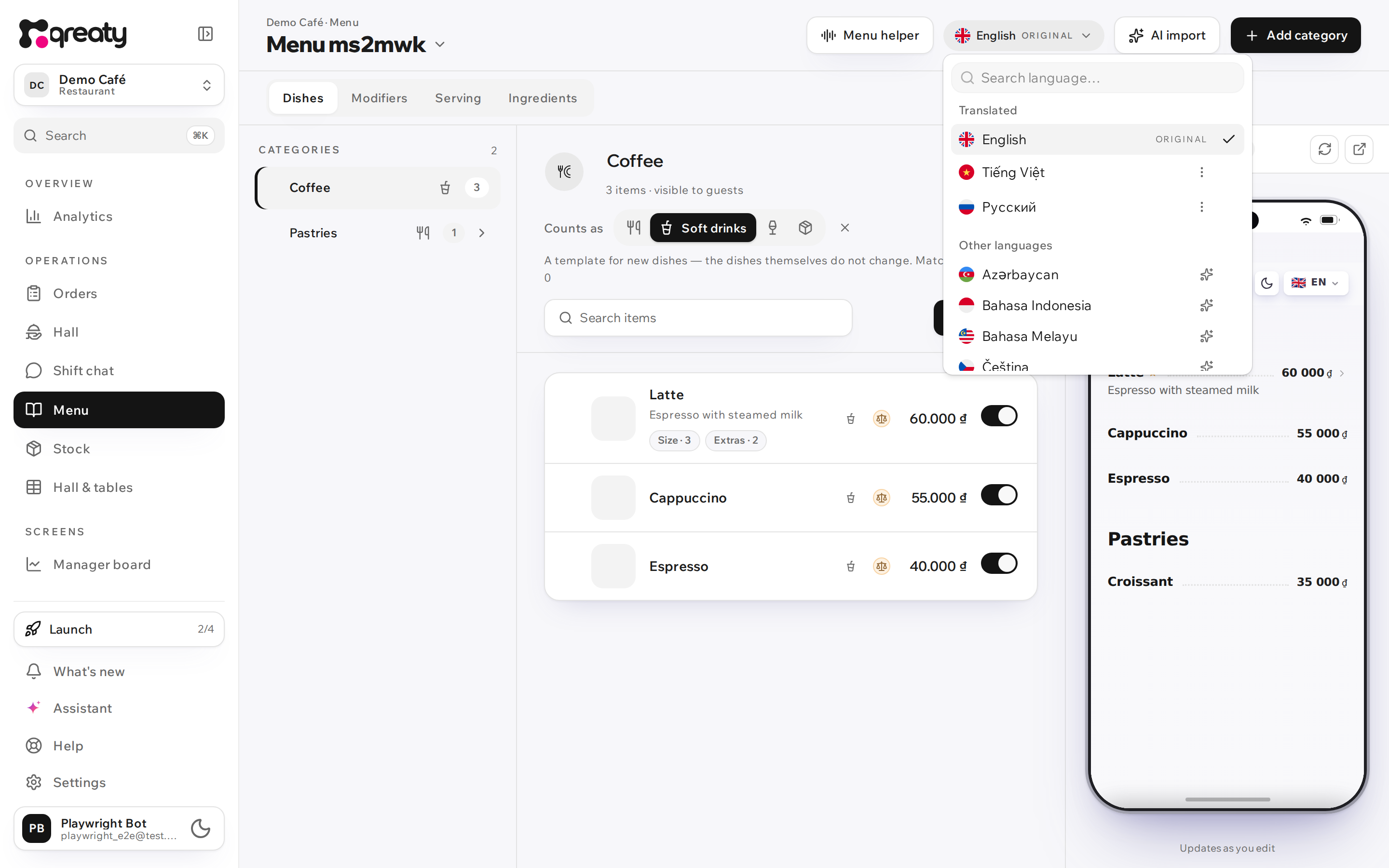
The editor header has the content language switcher: it decides which language you're currently viewing and editing the menu texts in. The list is split into two groups:
- "Translated" — languages the menu already has. The original language is pinned on top with the "Original" tag. Clicking switches the editor language.
- "Other languages" — languages the menu doesn't have yet, marked with ✨. Clicking offers to create the language via translation (see below).
Adding a language (AI translation)
Tap a language under "Other languages" and confirm — the menu's entire current content goes off for a background AI translation (queued). The editor does not switch into an empty language: the language is born already filled in, once the translation is ready.
- It's asynchronous: the translation lands in a minute or two, the page will let you know.
- Later spot edits to the original are forwarded into the translations automatically — background sync picks up the changed fields.
- Quick buttons for popular tourist languages also live on the success screen after the menu is created and in the setup checklist.
{info} An AI translation is a good-quality draft, not a guarantee: proofread terminology and brand names. Any string can be fixed by hand — see below.
Editing a translation by hand
Switch the active language to the target one and edit a dish's name/description —
a translation is saved in that language without touching the original. On the
guest menu, ?lang=<locale> shows the translation.
Untranslated fallback
If a field isn't translated into the requested language, the original-language
text is shown. Example: the name is translated to vi but the description
isn't → on ?lang=vi the name is Vietnamese, the description is the original.
There are never empty holes in the menu.
Creating only in the original language
New sections, dishes, modifier groups and options can only be created while the editor is switched to the original language. In a translation language the add buttons are disabled, and the hint names the original language.
Why: an item created "inside a translation" would have no source string — in every other language (and on the kitchen ticket, which freezes names at order time) it would come out nameless.
{warning} Only creating is blocked. Renaming and editing existing texts works in any language — that's what translating is.
Changing the original language
The action menu of a translated language has "Make this the original language". Condition: the target language must be fully translated (every source field) — otherwise the operation is rejected. After the change, existing translations are kept, and new items are written in the new original.
Removing a language & the limit
- Delete language — in the language's action menu; the original language can't be deleted.
- A menu has a limit on the number of languages — it depends on the plan (limits); once it's reached, the "Other languages" list is replaced by a limit notice. Keep the languages your guests actually read.