Kitchen
- What this screen is
- The ticket board
- Moving dishes along
- Card colour and time thresholds
- Ready from the till
- Kitchen on a phone
- Alert messages
- Shift: taking a ticket and stats
- Served today
What this screen is
Kitchen is the cooking queue: tickets for confirmed orders and readiness marks. The screen is open to any role with the "Dish readiness" permission and to a shared kitchen device (kiosk). The kitchen doesn't confirm orders and doesn't serve them — it only moves dishes along.
The screen is made for a tablet or a wall monitor: it runs full screen and refreshes itself, nothing to tap to update.
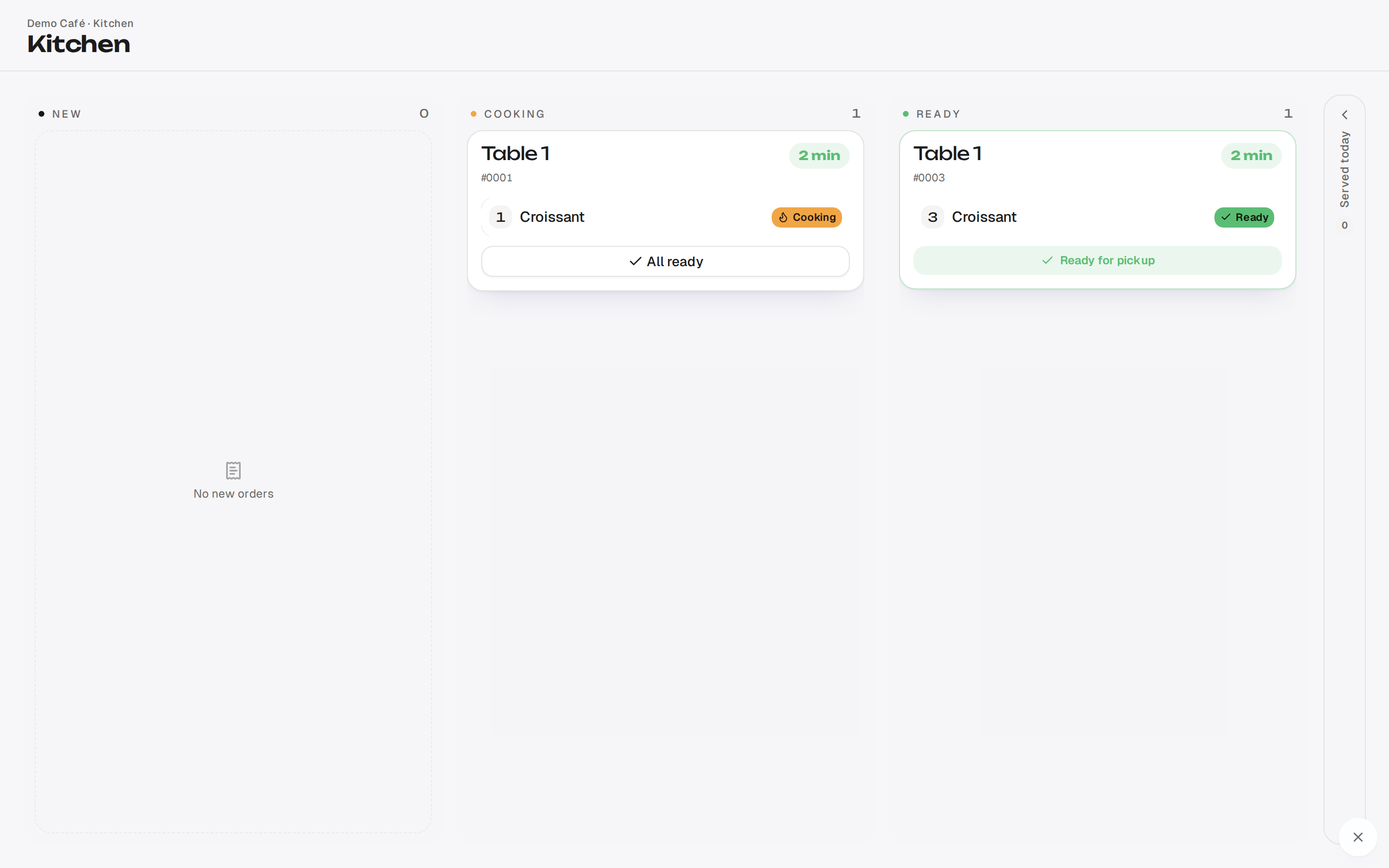
The ticket board
Tickets sit in three columns: New (just arrived), Cooking, Ready (waiting for a waiter). On the side there's a collapsed Served today rail.
A card shows the order number, the table, the lines, guest notes and the waiting time. If the venue asks guests for a name and a room number, they sit next to the table — the runner finds the guest even if they have moved. A guest note appears in the kitchen's language, with the original underneath if it differed.
The "Paid" mark. If the till closes the table's bill while a dish is still cooking, the ticket does not disappear: it stays in its column marked "Paid" and leaves as usual once the dishes are marked ready and served. Cook it like any other.
Orders that arrive after an outage. If the till worked without internet (the till without internet), its orders appear on the kitchen screen only once the connection is back:
- "offline, ticket printed HH:MM" — the ticket already came out of the kitchen printer at that time, so the order is most likely cooking. The card goes straight to "Cooking", without a sound, and its timer colour stays off.
- "ticket was not printed" — the kitchen doesn't know about this order yet. The card arrives in "New" with a sound, like any new order.
{warning} If the kitchen has only a screen and no printer, the till's orders don't reach it during an outage — pass them on by word of mouth.
Moving dishes along
The kitchen advances each dish separately: a tap on a line moves it "Waiting → Cooking → Ready". On a touch screen a swipe right does the same.
- "Start cooking" on a new ticket — marks that the kitchen has taken the whole order and moves it into Cooking.
- "All ready" marks every remaining dish of the order ready at once.
{info} On a phone the logic is shorter: one tap on a line marks the dish ready straight away.
{success} If two cooks tap at the same time, only the first tap counts — nothing breaks, the board simply shows the real state.
Card colour and time thresholds
The time on a card changes colour: green → yellow → red, and a ticket that has sat too long starts blinking. That way a forgotten order is visible from across the kitchen.
The thresholds live in Settings → Screens, the "Kitchen timing" block: after how many minutes a card turns yellow and after how many it turns red. The defaults are 5 and 10 minutes.
{info} The thresholds are shared across the venue — you can't set them per station or per menu category. A card in the Ready column is no longer highlighted: it's out of the kitchen's hands.
Ready from the till
The "Confirm ready from POS" setting (Settings → Screens) lets the person at the till mark items ready themselves.
This is for drinks and everything the kitchen never sees: coffee, cocktails, ready-made desserts. Without it those items would wait for the kitchen and hang.
{info} The setting doesn't change the kitchen screen. Some dishes on a ticket may simply turn out to be marked ready by someone other than a cook — that's normal.
Kitchen on a phone
On a phone the board becomes a queue with counter tiles and filters. A tap on the card header opens focus mode: one ticket filling the screen, large lines, a timer and the stage. A single tap on a line marks the dish ready.
{info} Focus mode is the only way to the full order card from a phone (the ⓘ button next to the main button).
Alert messages
When something changes in an order that is already cooking, the kitchen sees a card it can't miss:
- "Order cancelled — stop" (red) — the whole order was cancelled; under the title are the dishes, plus the reason and who cancelled it.
- "Voided: {dish}" (red) — one item was removed, take it off the stove.
- "Order changed — new dish" (yellow) — an item was added to an order already cooking.
Each message is dismissed with the "Got it" button.
{warning} A cancelled order disappears from the board right away, and this message is the only trace. Don't dismiss it unread: otherwise the dish keeps cooking for nothing.
Shift: taking a ticket and stats
The "Start cooking" button is a "seen it, on it" mark: the full card keeps who took the order and when. A separate Shift tab shows how the day is going: how many tickets went through, average times.
{info} The "picked it up" mark can't be taken back. If a ticket was taken by mistake, it stays in Cooking — just move the dishes along.
Served today
The narrow rail on the right (a separate tab on a phone) keeps today's served orders: number, table and time served, the last thirty. A tap opens the lines — to see after the fact what went out.
{info} This is the kitchen's version of history: a served order can't be put back on the board, and there are no prices here — money lives at the till (Feed and archive).
If the Ready stage is switched off at the venue, there's no kitchen screen at all — an order goes from confirmation straight to serving (Auto / On / Off).